
Website Archive: What It Is, How It Works, and Why It Matters
- Jan 28
- 3 min read


A website archive is a digital record of how websites looked and functioned in the past. It allows users to view older versions of web pages, track changes over time, and access content that may no longer be available online. As websites constantly evolve, website archives play a critical role in preservation, research, and transparency.
With millions of people searching for website archive, interest continues to grow among researchers, developers, businesses, and everyday internet users.
What Is a Website Archive
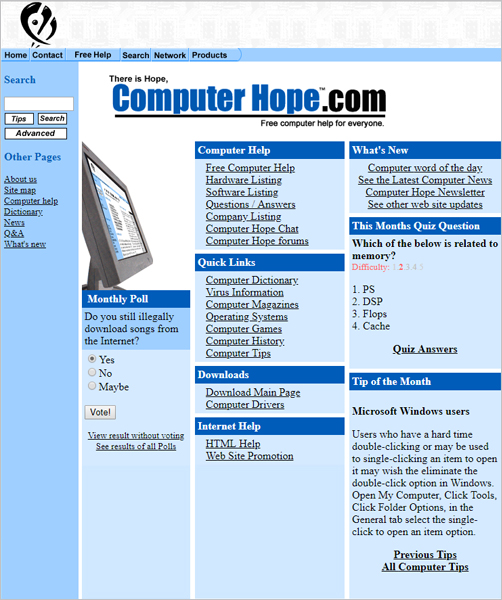
A website archive is a collection of saved versions of web pages captured at different points in time. These archived versions store snapshots of websites, including text, images, layouts, and sometimes functionality.
Website archives allow users to:
View how a website looked in the past
Recover deleted or changed content
Track design and content evolution
Verify historical information
How a Website Archive Works
Website archives work by automatically or manually crawling websites and saving copies of their pages. These snapshots are stored on archive servers and organized by date.
The process typically involves:
Crawling a website URL
Capturing page content and structure
Storing time-stamped versions
Allowing users to browse archived snapshots
One of the most well-known website archive platforms is Internet Archive, which operates the Wayback Machine.
Why Website Archives Are Important
Website archives serve many essential purposes in the digital world.
Key reasons website archives matter:
Preserve internet history
Provide evidence of past content
Support academic and legal research
Help journalists verify information
Allow businesses to track competitors
Without website archives, large portions of internet history would be permanently lost.
Website Archive for Research and Education
Researchers and students use website archives to study:
Historical events and timelines
Changes in public messaging
Website design trends
Digital culture evolution
Archived websites provide primary-source material that cannot be altered after capture.
Website Archive for Businesses


Businesses use website archives for:
Competitive analysis
Brand evolution tracking
Legal documentation
Content verification
SEO and redesign reference
Archived versions of competitor websites can reveal past pricing, messaging, and marketing strategies.
Website Archive and Legal Evidence
Website archives are often used as supporting evidence in:
Trademark disputes
Copyright cases
Contract disagreements
Regulatory investigations
Archived web pages can show what information was publicly available at a specific time.
Website Archive for Developers and Designers
Developers and designers use website archives to:
Study legacy web technologies
Understand UX and UI trends
Recover lost code or content
Reference older layouts
Website archives provide inspiration and technical insights from earlier web eras.
Types of Website Archives




There are several types of website archives:
Public Website Archives
Accessible to everyone and store snapshots of millions of websites.
Private Website Archives
Created by organizations to store internal or proprietary websites.
Manual Website Archives
Saved intentionally by individuals or teams for documentation purposes.
Each type serves different needs but follows the same core concept of preservation.
Website Archive Limitations
While powerful, website archives are not perfect.
Common limitations include:
Missing images or media
Incomplete page captures
Blocked or restricted content
Dynamic elements not loading
Despite these limitations, website archives remain highly valuable.
Is Website Archive Content Legal to View
Viewing archived websites is generally legal. However, how the archived content is used matters.
Acceptable use:
Research and reference
Educational purposes
Personal browsing
Restricted use:
Republishing copyrighted material
Commercial reuse without permission
Always respect intellectual property laws.
Website Archive and SEO
Website archives do not directly affect search rankings, but they support SEO indirectly by:
Preserving old content for reference
Helping diagnose lost traffic issues
Tracking historical SEO changes
Recovering removed pages
SEO professionals often rely on website archives to understand past site performance.
Common Website Archive Use Cases
Viewing deleted blog posts
Checking old product pages
Verifying historical claims
Analyzing competitor changes
Restoring lost content
These use cases explain why website archive tools remain in high demand.
Frequently Asked Questions
What is a website archive used for
A website archive is used to view and preserve older versions of websites for research, verification, and historical reference.
Can I archive my own website
Yes, websites can be archived manually or automatically using archiving services.
Do website archives store all websites
No, not all websites are archived. Some block archiving or are never crawled.
Are website archives permanent
Many archives store data long-term, but permanence depends on the service.
Conclusion
A website archive is a vital tool for preserving the history of the internet. From research and education to business analysis and legal evidence, website archives ensure that digital information is not lost over time.
As websites continue to change rapidly, website archives remain essential for transparency, accountability, and knowledge preservation.


Comments